




Every project I build has a name with a specific meaning. Dorix was named after my dog, Doris, and Eolas comes from the Irish word for knowledge. For this project, the name “Pochy” comes from the South American indigenous Guarani language, where it translates to “angry” or “grumpy” – a perfect fit for the device’s personality.
The idea for Pochy started with a simple hardware discovery: an ESP32 chip bundled with two rounded LED screens that perfectly simulated animated eyes. It also included standard battery and speaker connectors, plus a built-in USB-C charging port.
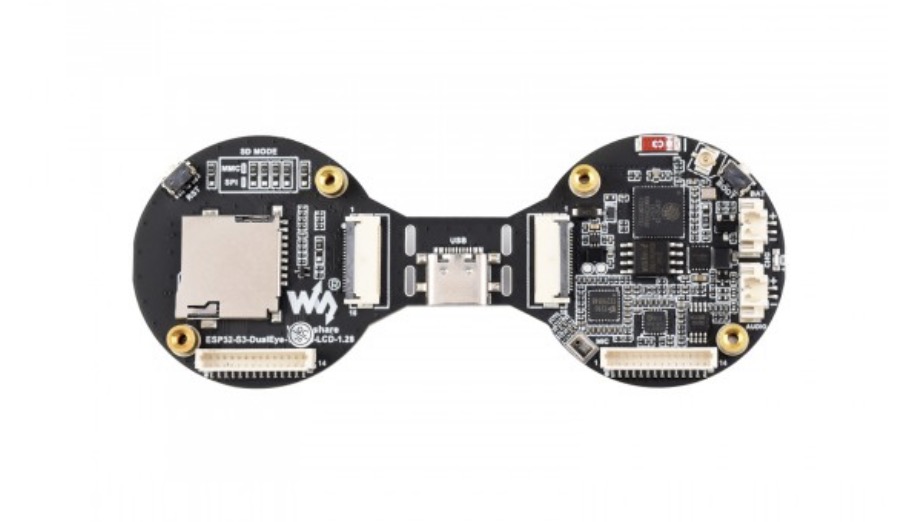
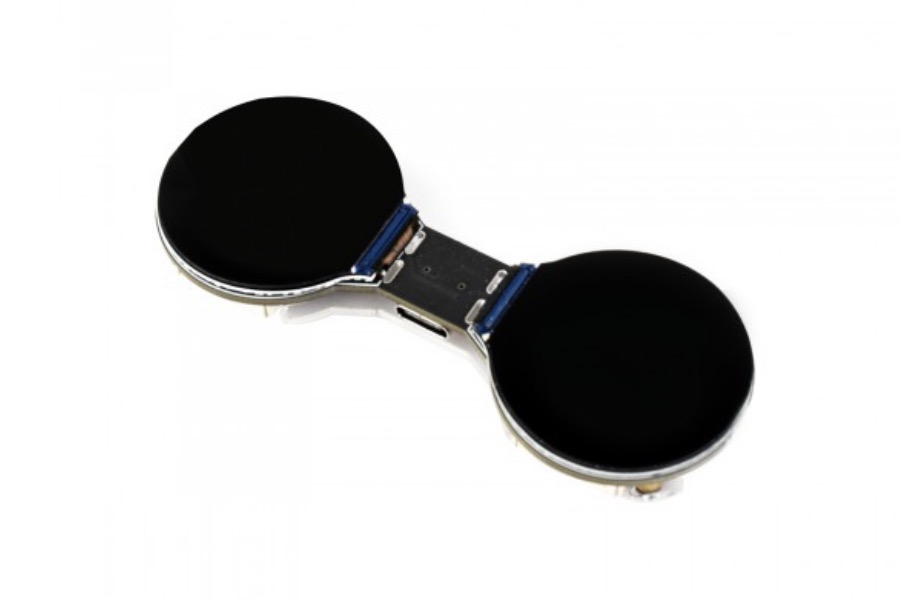
I wanted to build something cool with it, so I started by coding the eyes just to ensure everything worked and to test a few funny mini-games directly on the hardware. Once the code logic proved viable, the brainstorming began.
When building side projects, my approach is often like making art – it doesn’t always need to make immediate practical sense; it just needs to translate an idea from my brain into the physical world. For Pochy, the goal was to create a tangible, interactive companion that felt alive.
Prototyping and the Leap to Shapr3D
To keep the device compact and minimize complex soldering, I made a strict design decision: I would keep the stock USB-C connector exactly where it was, right between the eyes. While removing it would have allowed me to reduce the gap between the screens, it would have required routing and soldering a new port elsewhere. Instead, I decided to design the 3D model entirely around that constraint.
Because Pochy is roughly the size of a keychain, the 3D printed shell needed to look incredibly polished. While I had used Tinkercad for my previous voice assistant project, Eolas, its basic toolset wasn’t going to cut it for the precise tolerances Pochy required. This pushed me to learn Shapr3D on the fly. Mastering this new software allowed me to place the internal components perfectly and achieve a professional finish.
The hardest mechanical challenge was designing the tactile “belly button.” While I intentionally avoided the heavy soldering of relocating the USB-C port, the project still required some simple, precise soldering to wire the belly button circuit to the board. The mechanical button itself went through multiple iterations: some versions were too big, others too small, and a few didn’t have enough travel distance or stayed permanently pressed against the internal switch. After plenty of trial and error, I found the exact tolerance that offered a satisfying, reliable click.
Rethinking Connectivity: Eolas Integration and Offline Independence
Initially, Pochy was designed as a physical extension of Eolas. By holding the belly button, the device records your voice and sends it to the Eolas platform. From there, Eolas handles the speech-to-text, triggers an LLM agent, and runs any custom automation or Model Context Protocol (MCP) calls. I even built a drag-and-drop workflow system in Eolas that allows complete control over Pochy – adjusting eye color, screen brightness, and volume dynamically based on AI responses.
To bridge the latency gap while Eolas processed the audio, I added local “thinking” events. Pochy would play an audio file stored on the device, saying something like, “Wait a second, let me think about it,” making the interaction feel much more natural.
However, I soon realized that tying Pochy exclusively to an Eolas subscription or local Eolas server would ruin the accessibility of the device. It needed to be fully functional entirely offline. I expanded the local event system to handle states like waking up, low battery, and charging. To give Pochy its distinct, grumpy personality – living up to its name – I implemented a dynamic mood-based audio engine. Depending on the device’s current mood, it randomly selects from over 20 different audio files per event, with full local support across 30 different languages.
The Companion App and Battery Optimization
Connecting IoT devices to Wi-Fi is notoriously painful. Initially, Pochy spun up its own Access Point (AP) for setup, which forced the user’s phone offline during the process. To fix this, I built a dedicated companion app that connects seamlessly via Bluetooth.
The app completely changes how you manage the device. You can manually adjust Pochy’s mood, eye color, and volume without ever needing the Eolas workflow. More importantly, it allowed me to drastically optimize the hardware’s power consumption. If a user disables the Eolas workflow feature inside the app, Pochy completely shuts off its internal Wi-Fi module. This simple architectural decision transformed Pochy from a power-hungry connected device into a highly efficient, long-lasting offline gadget.
The Virtual Pet Game and Hardware-Software Synchronization
Even with all the settings and voice features, Pochy still needed a core gameplay loop to keep users engaged. I transformed the companion app into a full-fledged virtual pet simulator. Inside the app, Pochy lives in a customizable room. It has dynamic stats you need to keep track of: hunger, fun, energy, cleanness, and patience. You can feed it – buying a sushi roll with in-game coins, for instance, fills hunger faster and boosts energy – and decorate its environment with rugs, frames, and performance boosters.
The magic happens in how the app and the physical device talk to each other. Every state is bidirectionally synced in real-time. If you neglect Pochy in the app and its patience drops or it gets angry, the physical device on your desk also becomes angry. If you change the eye color in the game, the physical LED screens instantly update.
This synchronization extends into the mini-games used to earn coins. In “Pochy Dash,” a side-scrolling runner game on the mobile app, you don’t just tap the phone screen. You can actually use the physical Pochy device as an arcade controller, pressing its mechanical belly button to make the digital character jump over obstacles.
Looking Back and Moving Forward
Building Pochy was an incredible exercise in balancing hardware constraints, software architecture, and user experience. What started as an experiment with an ESP32 and a couple of displays evolved into a multi-layered ecosystem spanning 3D modeling, embedded systems, Bluetooth communication, and mobile game development.
It taught me that while AI and complex cloud workflows (like Eolas) are powerful, the true magic of a physical companion lies in its personality and the seamless, instant interaction you have with it offline. Pochy is currently sitting on my desk, complaining when I wake it up and acting as a physical bridge to the digital world. It’s a perfect blend of nostalgic virtual pet mechanics and modern IoT technology, and it proves that sometimes, the most complex engineering challenges come from simply trying to build something fun.